
Tap Beats Rock1.0 - App Store
You'll be able to see results in few seconds.
Publisher Description
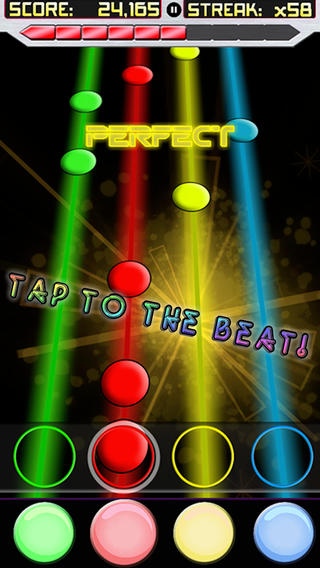
Tap Beats presents the next installment of it's hit rhythm game combined with the biggest genre of all time, Rock! Equipped with heavy vocals, extreme rifts, and more guitar solos than your device can handle! Tap to the beat, max your combo bar, and score insane points!
AWESOME FEATURES
JAM OUT WITH ROCK N' ROLL: Tap along with the beat, keep your rhythm and find glory as the ultimate Rock fan!
TONS OF MUSIC: A dozen of the heaviest high powered Rock songs you have ever heard! Earn credits based on your performance and unlock the more difficult tracks!
INDIVIDUAL RATINGS: Try to achieve three stars on every song to truly master the game!
PSYCHEDELIC VISUALS: HD Particle Effects rock the brain while you try to keep up with the beat!
The newest and hottest rhythm game is Tap Beats Rock! The only game bringing you Rock and Roll like you've never heard it before!
Requires iOS 3.1.3 or later. Compatible with iPhone 3GS, iPhone 4, iPhone 4s, iPhone 5, iPhone 5c, iPhone 5s, iPhone 6, iPhone 6 Plus, iPhone 6s, iPhone 6s Plus, iPhone SE, iPhone 7, iPhone 7 Plus, iPad, iPod touch (3rd generation), iPod touch (4th generation), iPod touch (5th generation), and iPod touch (6th generation).
About Tap Beats Rock
The company that develops Tap Beats Rock is AppHappy Studios LLC. The latest version released by its developer is 1.0.
To install Tap Beats Rock on your iOS device, just click the green Continue To App button above to start the installation process. The app is listed on our website since 2013-03-08 and was downloaded 0 times. We have already checked if the download link is safe, however for your own protection we recommend that you scan the downloaded app with your antivirus. Your antivirus may detect the Tap Beats Rock as malware if the download link is broken.
How to install Tap Beats Rock on your iOS device:
- Click on the Continue To App button on our website. This will redirect you to the App Store.
- Once the Tap Beats Rock is shown in the iTunes listing of your iOS device, you can start its download and installation. Tap on the GET button to the right of the app to start downloading it.
- If you are not logged-in the iOS appstore app, you'll be prompted for your your Apple ID and/or password.
- After Tap Beats Rock is downloaded, you'll see an INSTALL button to the right. Tap on it to start the actual installation of the iOS app.
- Once installation is finished you can tap on the OPEN button to start it. Its icon will also be added to your device home screen.
Program Details
System requirements
Download information
Pricing
Version History
version 1.0
posted on 2013-03-08
Disclaimer
Official App Store Link
We do not host Tap Beats Rock on our servers. We did not scan it for viruses, adware, spyware or other type of malware. This app is hosted by Apple and passed their terms and conditions to be listed there. We recommend caution when installing it.
The App Store link for Tap Beats Rock is provided to you by apps112.com without any warranties, representations or guarantees of any kind, so access it at your own risk.
If you have questions regarding this particular app contact the publisher directly. For questions about the functionalities of apps112.com contact us.
